A receipt scanner that starts with a durable draft.
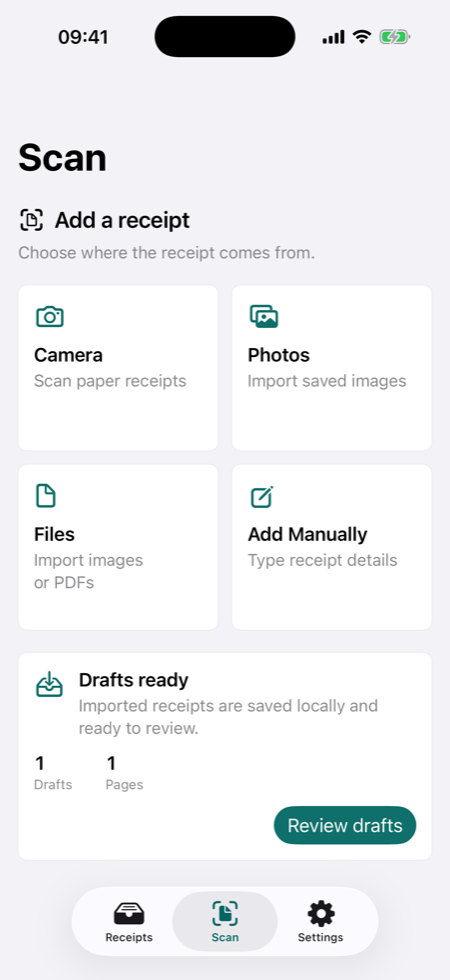
Receipt capture is fragile when an app treats scanning as the final step. TillShot saves imported receipts locally as drafts before recognition begins. That means you can continue manually, install recognition later, or come back to the batch without losing the original image.
Multiple ways to add receipts.
TillShot is built for the messy reality of receipt collection. Some receipts are paper slips, some are images in Photos, some are PDF invoices, and some are details you only have in text form.
- Camera scanning for paper receipts.
- Photos import for saved receipt images.
- Files/PDF import for invoices, emailed receipts, and downloads.
- Manual entry for edge cases and quick records.
Recognition helps, review decides.
When on-device recognition is installed on a supported iPhone, TillShot can suggest merchant, date, total, currency, tax, payment method, folder, category, and notes. The app still opens a review screen before saving so the final record stays under your control.
Where to go next.
If you are scanning for taxes, reimbursement, or business records, read how TillShot handles freelance expense tracking and accountant-ready receipt export.
Receipt scanner FAQ
Can I use TillShot without recognition installed?
Yes. Manual entry and local receipt organization work without downloading the recognition package.
Can TillShot import PDF receipts?
Yes. TillShot supports Files/PDF import and renders receipt pages locally into durable receipt drafts.