Receipt export should preserve the record.
An export is only useful when it keeps the reviewed fields and the original evidence close together. TillShot is designed so exports come from the local receipt archive after you have reviewed the important fields.
Three export paths.
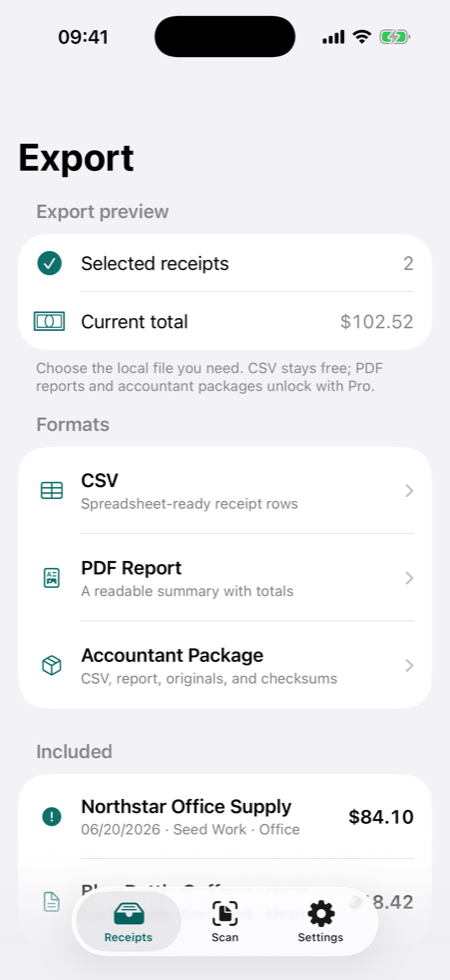
- CSV: a spreadsheet-safe file for selected receipts.
- PDF Report: a readable Pro report with receipt summaries and totals.
- Accountant Package: a Pro package with structured data, report output, original receipt images, byte counts, and SHA-256 checksums.
Local first, user-controlled sharing.
TillShot creates export files locally and then opens the iOS Share Sheet. You choose whether the file goes to Files, Mail, AirDrop, your accountant, a cloud drive, or somewhere else.
Not bookkeeping advice.
TillShot helps prepare receipt records for review. It does not determine tax categories, deductibility, compliance, reimbursement eligibility, or accounting treatment.
Receipt export FAQ
Is CSV export free?
Yes. CSV export is part of the useful free workflow. PDF Report and Accountant Package exports are Pro features.
Do exports include original receipt images?
The Pro Accountant Package is designed to include original receipt images along with structured receipt data and integrity checks.